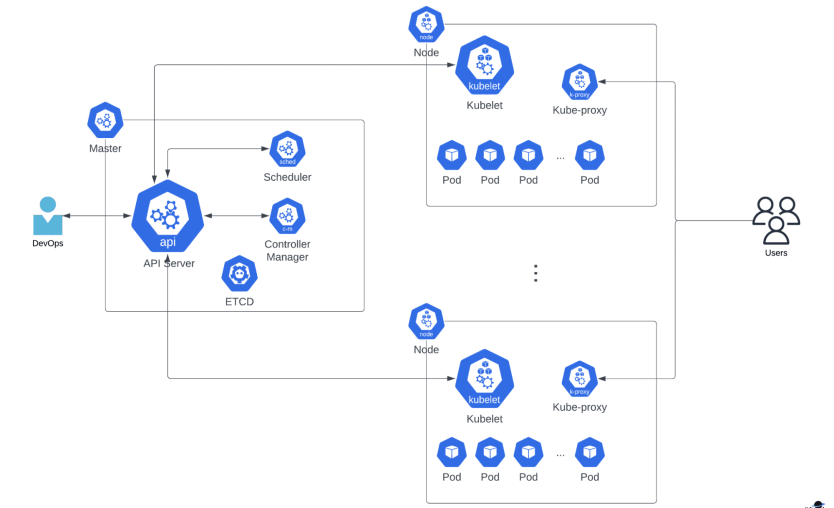
Open Source container orchestration tool developed by Google which provides a platform for scheduling and automating the deployment.
It helps us in managing containerized applications.
Since there is an advancement of applications from a monolithic architecture to microservices, this has led to an increase in the number of containers. So, orchestration tools help in managing these containers.
But it not only helps in orchestration, with Kubernetes:
We can run deploy our applications
It provides us with zero-downtime updates
it helps in scaling applications, replicating services, load balance of requests etc.
Interesting facts on Kubernetes: It is also known as 'k8s' because It starts with 'k' and ends with 's' and there are 8 letters between them !!
It is made open source by Google and is donated to CNCF.
Benefits of Orchestration Tools
High availability or no downtime
Scaling of the application is faster even if it has more load. It offers much flexibility.
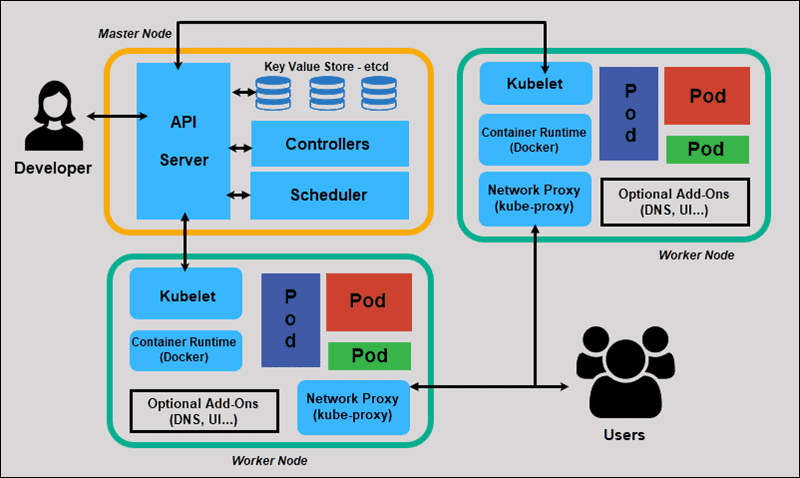
Kubernetes Architecture
Kubernetes Terminologies
Let's look into the terminologies which help us in understanding the Kubernetes architecture.
Kubernetes Cluster:
It is a collection of Nodes and a Control plane. (Previously Control plane was known as the Master Node)
Control Plane: It looks into the k8s processes required to run and manage the cluster properly or we can say it looks after the running of working notes.
Nodes or Worker Nodes: It is the node where the application runs.
Kubectl
It is k8s command line tool used to communicate with the Kubernetes control plane using Kubernetes API.
Kubelet
It helps in communication between the worker nodes, which helps in executing the tasks on nodes.
Now let us look towards the architecture present in the control plane or master node :
API Server
It is the entry point to k8s cluster. It validates and configures data for API objects.
Control Manager
It keeps an overview of what is happening in the cluster, what needs to be repaired, and what if the container dies and needs to be restarted. Such analysis of happenings within the cluster is taken care of by the control manager.
Scheduler
It schedules containers on the work node based on the load present. In simple terms, we can say that it decides on which node the new pod should be scheduled.
etcd
It stores the data in the key-value pair. It stores the current state of k8s cluster. It has the status of each node and container within it and also contains config data inside it.
Components present in worker nodes
Kube-proxy
- A major component in k8s which helps in maintaining the networking rules on cluster nodes.
Pod
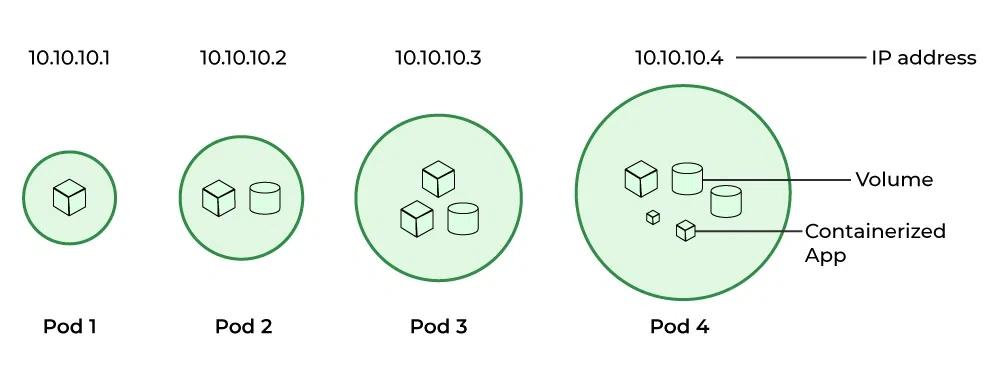
It is the smallest scheduling unit in k8s which creates a running environment on top of the container. We can have multiple containers in the pod.
Each pod has an IP address which helps in communication internally, This IP address is not a public one.
These pods are ephemeral, which means that they can die easily. This can happen due to various reasons like an application getting crashed inside the pod, the container getting crashed or the node on which it is running getting out of resources.
So what happens when the pod dies?
A new pod gets created in its place, this leads to a new IP address. So, for the communication to continue between pods internally, the IP address needs to be updated. This gets quite chaotic at times!
So we have SERVICE, it is like giving a permanent IP address to the pod. This means that if the pod dies, then IP address doesn't change even after a new pod gets created in place of the previous pod.
We can say that the lifecycle of the pod and service are not connected.
So this 'SERVICE' also acts as a load balancer.
ConfiMap
It contains configuration data, the external URL of the database or other services you use.
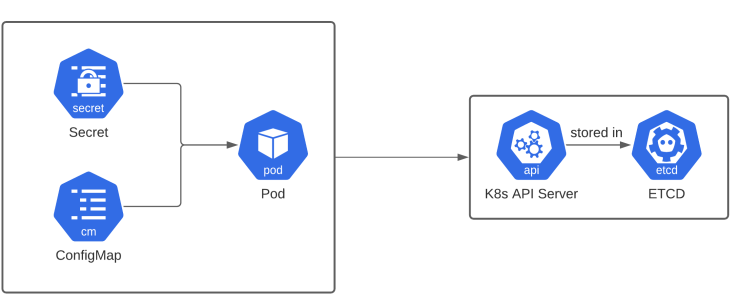
In k8s, we connect it to the pod, so this pod gets data which is present in the config map.
Secret
For confidential information to be secured like passwords, usernames etc, k8s offers a component called 'secret'.
It stores the information like Config Map only but in a secretive manner.
It is not stored in the form of plain text format, we store it in base 64 encoded format.
But it doesn't make it automatically secure, these secret components are encrypted using 3rd party tools.
This secret component is connected to the pod.
Volume
In a scenario, where when the pod gets restarted, data is gone and this leads to a problematic situation.
Our motto is to secure the database for the long term and make it reliable.
So, in k8s we have a component called ' Volume'.
Here the physical storage is attached to the hard drive of your pod.
Storage refers to an external hard drive plugin. This storage can be on a Local machine (on the same server node where the pod is running) or it can also be remote storage (outside of k8s structure).
Deploy
Consider a scenario, where the pod dies or we restart the pod as we install a new container in the pod. This leads to downtime of the application which is considered a very bad thing in production!
So instead of relying on one pod for the whole usage of the application, we create replicas of the pod on multiple servers.
This is the main advantage of containers.
In simple terms, we can say it is like a clone is connected to a service( because the service component is like a permanent IP address).
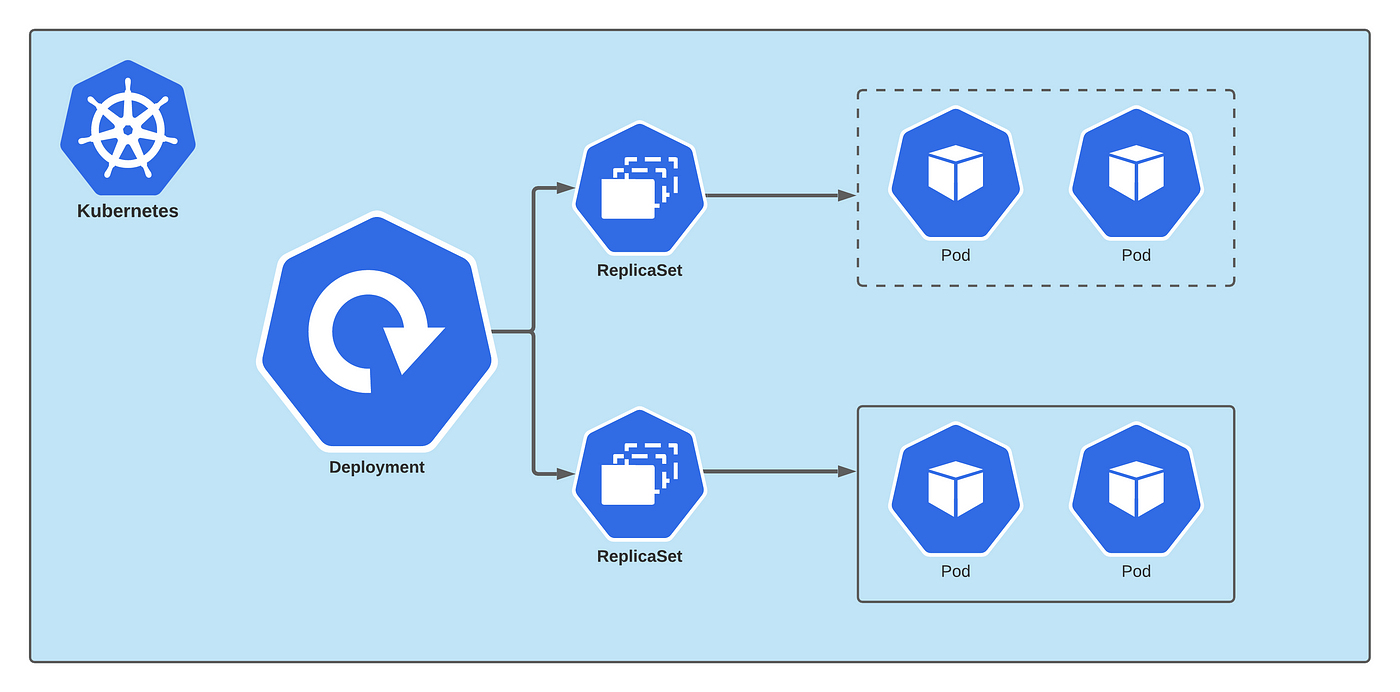
When these replicas are being made, we are not making a completely new pod, it is like we create a new blueprint, this 'deploy' component in k8s helps in making replicas.
So, practically we are not working with pods, we work with the deployments, we can upscale or downscale these deployments.
This eradicates the scenario of downtime of the application.
Remember the major point that " when we say deployments are made or replicas are made, we are not replicating the database".
StatefulSet
This k8s component helps in creating a mechanism which helps in reading the database or writing the database to avoid data inconsistencies and it also offers replication of databases.
The problem is that deploying StatefulSet applications is not easy.
So to avoid this problem, the Database is hosted outside the k8s cluster.
Then the application becomes a Stateless application, hence the deployment of the application becomes easier.
Icons of Kubernetes Components